

I was in Singapore a few days back for Ahrefs Evolve.
My first-ever marketing conference. Two days of learning sessions, great conversations, and some really good friendships made along the way.


And this newsletter went quiet for almost a month. Work happened. But something has been sitting in my drafts the whole time.
A webinar content system I built at AddSearch using Claude Code. I’ve rebuilt it for an imaginary brand called Calzy AI, and it’s going on GitHub as a public repository that you can clone.
That’s what this issue is about.
If you run webinars as a solo marketer or a small team doing ten other things, this might save you a few hours every time.
Running Webinars as a Solo Marketer: The Full Workload Nobody Mentions
Most content about webinars focuses on the webinar itself.
The topic. The guest. The slides. The host performance. But the webinar is maybe 20% of the actual work.
Here is what running a webinar actually looks like when you are the only person handling it.
Before anything goes live, you need to write a registration page. That means a title, a description, speaker bios, and banner copy. Then you need five promotional emails to go out in the days leading up to the event. Then, a website banner for your homepage. Then, LinkedIn posts for your company page and your personal page. Then, a structured Q&A outline so the host knows what to ask and in what order.
That is seven pieces of content before the webinar even happens.
Then the webinar runs. Maybe 45 minutes. And the moment it ends, the next wave starts.
Post-webinar, you need to send the recording to everyone who registered. Then a follow-up email with the key takeaway. Then a blog outline to capture what was discussed. Then LinkedIn posts again. Then someone needs to go through the recording and flag which moments are worth cutting for short-form video clips.
By the time you are done, one webinar has produced somewhere between 12 and 15 content assets. All of them need to be on-brand. All of them are time-sensitive. And all of them need to be written from scratch unless you have a system.
Most small teams do not have a system.
The Claude Code Webinar Content Agent System
I built this at AddSearch because I kept writing the same types of content for each webinar, and it was eating my time.
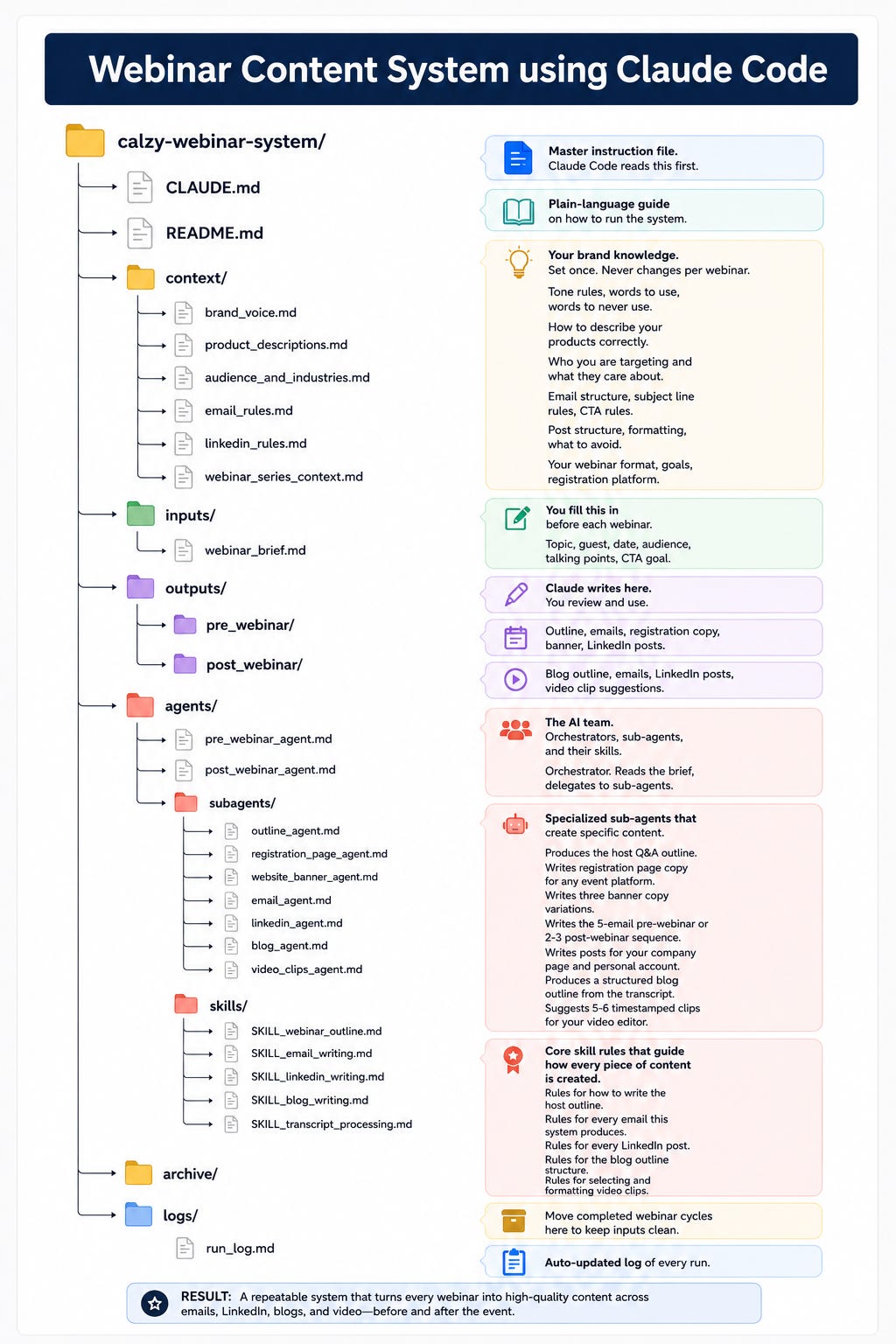
The solution: a Claude Code project that sits in a folder in VS Code. You fill in a short brief. You run one command. Claude Code reads your brand context, delegates to a set of sub-agents, and produces all the pre-webinar or post-webinar content assets as output files. You review, edit, and use them.
The AddSearch version is internal. I cannot share that publicly.
So I rebuilt the exact same system for a fictional brand called Calzy AI, a made-up calendar and productivity SaaS, and put it on GitHub. Same architecture. Same file structure. All brand details replaced with fictional ones so it is safe to share.
Here is what lives inside the folder:
calzy-webinar-system/
│
├── CLAUDE.md                            ← Master instruction file. Claude Code reads this first.
├── README.md                            ← Plain-language guide on how to run the system.
│
├── context/                             ← Your brand knowledge. Set once. Never changes per webinar.
│   ├── brand_voice.md                   ← Tone rules, words to use, words to never use.
│   ├── product_descriptions.md          ← How to describe your products correctly.
│   ├── audience_and_industries.md       ← Who you are targeting and what they care about.
│   ├── email_rules.md                   ← Email structure, subject line rules, CTA rules.
│   ├── linkedin_rules.md                ← Post structure, formatting, what to avoid.
│   └── webinar_series_context.md        ← Your webinar format, goals, registration platform.
│
├── inputs/                              ← You fill this in before each webinar.
│   └── webinar_brief.md                 ← Topic, guest, date, audience, talking points, CTA goal.
│
├── outputs/                             ← Claude writes here. You review and use.
│   ├── pre_webinar/                     ← Outline, emails, registration copy, banner, LinkedIn posts.
│   └── post_webinar/                    ← Blog outline, emails, LinkedIn posts, video clip suggestions.
│
├── agents/
│   ├── pre_webinar_agent.md             ← Orchestrator. Reads the brief, delegates to sub-agents.
│   ├── post_webinar_agent.md            ← Orchestrator. Reads the transcript, delegates to sub-agents.
│   └── subagents/
│       ├── outline_agent.md             ← Produces the host Q&A outline.
│       ├── registration_page_agent.md   ← Writes registration page copy for any event platform.
│       ├── website_banner_agent.md      ← Writes three banner copy variations.
│       ├── email_agent.md               ← Writes the 5-email pre-webinar or 2-3 post-webinar sequence.
│       ├── linkedin_agent.md            ← Writes posts for your company page and personal account.
│       ├── blog_agent.md                ← Produces a structured blog outline from the transcript.
│       ├── video_clips_agent.md         ← Suggests 5-6 timestamped clips for your video editor.
│       └── skills/
│           ├── SKILL_webinar_outline.md       ← Rules for how to write the host outline.
│           ├── SKILL_email_writing.md         ← Rules for every email this system produces.
│           ├── SKILL_linkedin_writing.md      ← Rules for every LinkedIn post.
│           ├── SKILL_blog_writing.md          ← Rules for the blog outline structure.
│           └── SKILL_transcript_processing.md ← Rules for selecting and formatting video clips.
│
├── archive/                             ← Move completed webinar cycles here to keep inputs clean.
└── logs/
    └── run_log.md                       ← Auto-updated log of every run.
What each part does:
CLAUDE.md is the first file Claude Code reads in any session. It explains what the project is, how the folders connect, and what each run is supposed to produce. Think of it as the standing brief that never changes.
The context folder is where your brand lives. Six files covering voice, products, audience, email rules, LinkedIn rules, and webinar format. You update these when your brand guidelines change, not per webinar. Every sub-agent reads these before it writes anything.
The inputs folder is the only thing you touch before each webinar. Fill in webinar_brief.md with the topic, guest details, date, target audience, and key talking points. That is all the agent needs.
The agents folder has two orchestrators: one for pre-webinar, one for post-webinar. Each orchestrator reads your brief, reads all context files, then delegates to a set of sub-agents running in parallel. Each sub-agent handles exactly one job.
The skills folder is where the real writing rules live. How to write an email subject line. How to structure a post-webinar LinkedIn post. What to look for when flagging video clips from a transcript. These are detailed enough that a sub-agent can produce on-brand content without you explaining your brand again.
The outputs folder is where everything lands. Pre-webinar and post-webinar outputs live in separate subfolders. Claude writes here. You read, edit, and copy to wherever it needs to go.
How the Pre-Webinar and Post-Webinar Claude Code Pipelines Actually Run
Running the system is two commands across the whole webinar cycle.
Pre-webinar run (2 to 3 weeks before the webinar):
Step 1: Open webinar_brief.md and fill in all the fields. Topic, guest name and title, host name, date, time, timezone, target audience, 5 to 8 talking points, and CTA goal.
Step 2: Open VS Code. Open Claude Code inside the calzy-webinar-system folder.
Step 3: Type this:
Run the pre-webinar agent. Read the brief in inputs/webinar_brief.md and produce all pre-webinar outputs.
Claude Code reads the brief, reads all six context files, then runs five sub-agents in parallel. Each sub-agent reads its skill file first, then produces its output.
When it is done, five files land in outputs/pre_webinar/:
webinar_outline.md — A full Q&A outline for your host with suggested questions, follow-up prompts, seed questions for the audience Q&A, and a closing CTA script.
registration_page_copy.md — Event title, description, speaker bios, date/time, and banner copy. Ready to paste into Luma, Zoom Events, or whatever platform you use.
website_banner_copy.md — Three banner variations: short, medium, and one with the guest name. Pick the one that fits your available space.
promo_emails.md — A five-email promotional sequence. Announcement, why this matters now, what you will walk away with, why this session is different, and happening tomorrow. All on-brand. All with placeholder registration URLs.
linkedin_posts.md — One post for your company page and one for your personal account. Different angles. Links go in comments.
Post-webinar run (within 24 to 48 hours of the webinar):
Step 1: Drop your transcript file into the inputs/ folder. Name it transcript.txt or transcript.md.
Step 2: Open Claude Code in the same folder.
Step 3: Type this:
Run the post-webinar agent. Read the transcript in inputs/ and the brief in inputs/webinar_brief.md and produce all post-webinar outputs.
Claude Code reads the full transcript, builds an internal summary, then runs four sub-agents. Four files land in outputs/post_webinar/:
blog_outline.md — A structured outline with title options, target reader, H2 sections, pull quotes from the transcript, and notes on any gaps.
post_webinar_emails.md — Two to three emails: recording delivery, key takeaway, and an optional third only if there is something genuinely new to say.
linkedin_posts.md — Two posts, again with different angles per account.
video_clip_suggestions.md — Five to six timestamped moments with clip duration, a content summary, a direct quote to use in the caption, and a suggested social caption. Formatted for a video editor.
After each cycle, move everything from inputs/ and outputs/ into the archive folder. The system is clean and ready for the next webinar.
How to Clone This System and Adapt It for Your Own Brand
The GitHub repo has everything you need: https://github.com/rohitchavane/webinar-content-system
Inside the repo, there is also a file called how-to-make-it-yours.md that walks through the exact adaptation steps. But here is the short version.
Step 1: Clone the repo. Open the folder in VS Code with Claude Code running.
Step 2: Update the six context files with your brand details. This is the most important step. Brand voice, product descriptions, audience, email rules, LinkedIn rules, and webinar format. Do not rush this part. The quality of every output depends on how well these files describe your brand.
Step 3: Fill in inputs/webinar_brief.md for your next webinar.
Step 4: Run the pre-webinar agent and review the outputs.
First run outputs will need editing. That is expected. But they will be structured, on-brand, and specific to your webinar topic. You are editing from a strong draft, not starting from a blank.
Once you are happy with a run, the skill files are the place to improve the system over time. If the emails consistently need the same type of edit, update SKILL_email_writing.md. The agent will follow the new rules on every future run.
The System Is Modular: Add Any Sub-Agent You Need
The architecture makes it easy to extend.
If you run LinkedIn ads after webinars, add a linkedin_ads_agent.md file and a SKILL_linkedin_ads.md skill file. Tell it what to produce and how to produce it. Point the post-webinar orchestrator to it.
If you want a Twitter/X thread format, add a thread_agent.md. If you want a sales team briefing after each webinar, add that. If you want a recap email specifically for customers, add it.
Each sub-agent handles one job. Adding a new output type does not change anything else in the system. You are adding a new file, not rebuilding anything that already works.
The repo has a detailed example of how sub-agents are structured. Follow the same pattern for whatever you want to add.
Clone it here: https://github.com/rohitchavane/webinar-content-system
If you try it and run into something, reply to this email or find me on LinkedIn.
— Rohit